
Ranked
Price per rank step
- One price per rank step, for example Gold 1 to Gold 2
- Surcharge for few Power 11 brawlers and Buffies
- Options such as Carry, Express and Stream
- Own review and proof channels
For Brawl Stars boosting services
Customers open a private ticket and get a price in seconds. Your staff follow every order from payment to review. All of it runs on a dedicated bot with your name, colors and prices.
One dedicated bot per client server. 15 EUR per month, cheaper yearly.
From the first click to the review, everything happens in Discord.
A button on your panel opens a private ticket for them and your staff.
The Brawl Stars tag is read for Power 11, Buffies, gadgets and more. Nothing to type, and the estimate is on screen at once.
They tick options such as Carry, Express or Stream, enter a discount code and pick a payment method with your instructions.
Mark it paid, assign a booster, post proofs. When it is completed the customer is invited to leave a review.
Customer side
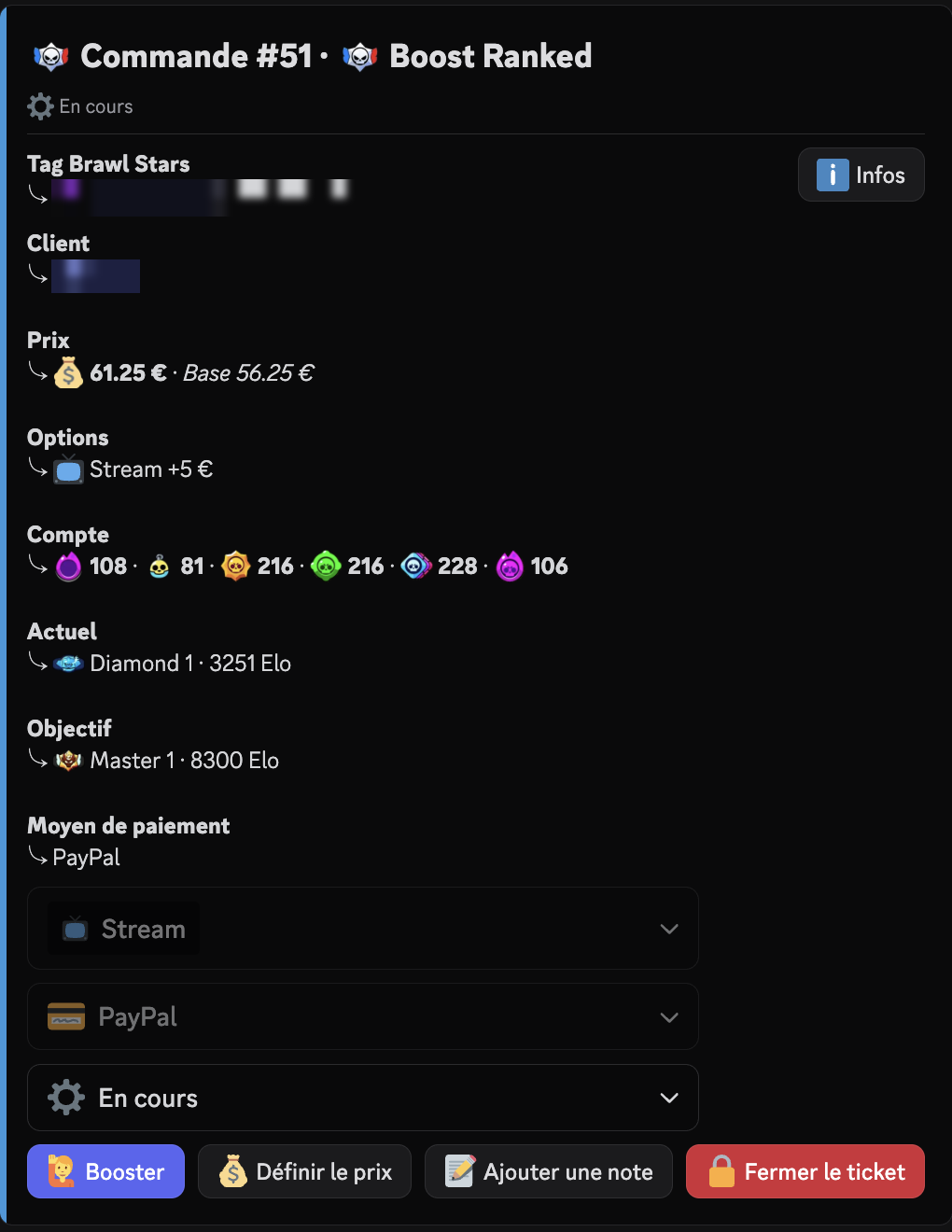
Each order opens its own channel with a recap card. The customer does everything from that card, and staff see exactly what was ordered.
The Brawl Stars tag gives the number of Power 11 brawlers, Buffies, Star Powers, gadgets, gears and hypercharges. If the tag cannot be read, the order still opens and the counts are marked as not verified.
Carry, Express, Stream, or options you create. They can be changed while the order is pending.
A Coupon button on the ticket. Leave it empty to remove the code.
The customer picks one and receives your instructions for it.
When the order is completed, the customer gets an invitation in the ticket and by DM, with stars, a comment and an anonymous option.
Pricing
You set the prices once. The bot calculates every order the same way and saves the result on the order, so changing your prices later never alters existing orders.
From your tiers: one price per rank step for Ranked, one price per trophy range for Prestige, a flat unit price for the pin.
Ranked only. The fewer Power 11 brawlers and Buffies the account has, the higher the price, up to a maximum you choose.
Multipliers first, then percentages, then flat amounts. The discount code is applied last and the price never goes below zero.
Staff can set the price by hand. That price wins and the options stop moving it.
Example with the three default options.
Every service has its own tickets category, panel and settings. Close a service at any time and it refuses new orders.
Price per rank step
Price per trophy range
Unit price x quantity
Buy and sell accounts
The controls are on the order card and only work for your staff role. Every change is logged with who did it and when.
Order status
Say who is doing the order, and see it per booster in the statistics.
Override the calculated price when you agreed something else.
Notes the customer never sees.
Staff drop images in the proof channel. The bot reposts them with your watermark and deletes the original.
An unpaid order with no message gets a warning in the ticket and by DM, then is closed and logged. By default after 48 hours, then 24 hours, and you can change both or switch it off.
Status changes, discount codes, publications, purchases and closings.
Dashboard
The dashboard shows orders, money collected, boosters and discount codes over the period you choose. You can also edit your prices and options there.
Open tickets and the month's money at a glance.
Every order, filtered by status, service or period.
Revenue, orders, boosters and discount codes over a period you choose.
Edit your prices, options, payment methods and discount codes.
Test what a boost costs with your current prices.
Revenue this month
1 240 €
Orders this month
31
Average order
40 €
Average completion time
2 d
Revenue per day
This month by service
Best boosters this month
Price per 100 Elo, per rank step.
| Step | Price |
|---|---|
| Gold 1 | 0.80 € |
| Gold 2 | 0.90 € |
| Gold 3 | 1.00 € |
| Diamond 1 | 1.20 € |
| Diamond 2 | 1.30 € |
The editor warns about holes, overlaps and a step cheaper than the one before it.
Setup
Name, colors, logo, footer, prices, roles, language and payment methods are all set from Discord.
/adminLanguage, staff and admin roles, name, color, logo, footer, log channel, watermark and payment methods.
/<service> setupTickets category, channels, prices, options and the customer panel, one page per service.
/debugLists what is missing or broken, with the command that fixes it.
LumaBoost gives your client server its own bot. Buy it with /buy in Discord or on the Subscriptions page of the dashboard.
A ticket bot for Brawl Stars boosting services, on your own server.
€15/ month
No. Each client server gets its own dedicated bot.
15 EUR per month, and cheaper if you pay yearly.
With /buy in Discord, or on the Subscriptions page of the dashboard at dashboard.lumabot.eu.
No. The Brawl Stars tag is read to get Power 11, Buffies, gadgets and so on, and the price estimate follows instantly.
Yes. Name, colors, logo, footer, prices, roles, language and payment methods are all set from Discord.
Existing orders keep the price they were created with. Only new orders use the new prices.
Run /debug: it lists what is missing.
Subscribe, set up from Discord, and take your first order.